 fceea033ad
Signed-off-by: Glenn Jocher <glenn.jocher@ultralytics.com>
Co-authored-by: UltralyticsAssistant <web@ultralytics.com>
119 lines
6.6 KiB
Markdown
119 lines
6.6 KiB
Markdown
---
|
|
comments: true
|
|
description: Parking Management System Using Ultralytics YOLOv8
|
|
keywords: Ultralytics, YOLOv8, Object Detection, Object Counting, Parking lots, Object Tracking, Notebook, IPython Kernel, CLI, Python SDK
|
|
---
|
|
|
|
# Parking Management using Ultralytics YOLOv8 🚀
|
|
|
|
## What is Parking Management System?
|
|
|
|
Parking management with [Ultralytics YOLOv8](https://github.com/ultralytics/ultralytics/) ensures efficient and safe parking by organizing spaces and monitoring availability. YOLOv8 can improve parking lot management through real-time vehicle detection, and insights into parking occupancy.
|
|
|
|
## Advantages of Parking Management System?
|
|
|
|
- **Efficiency**: Parking lot management optimizes the use of parking spaces and reduces congestion.
|
|
- **Safety and Security**: Parking management using YOLOv8 improves the safety of both people and vehicles through surveillance and security measures.
|
|
- **Reduced Emissions**: Parking management using YOLOv8 manages traffic flow to minimize idle time and emissions in parking lots.
|
|
|
|
## Real World Applications
|
|
|
|
| Parking Management System | Parking Management System |
|
|
|:-------------------------------------------------------------------------------------------------------------------------------------------------------:|:------------------------------------------------------------------------------------------------------------------------------------------------------------:|
|
|
|  |  |
|
|
| Parking management Aeriel View using Ultralytics YOLOv8 | Parking management Top View using Ultralytics YOLOv8 |
|
|
|
|
## Parking Management System Code Workflow
|
|
|
|
### Selection of Points
|
|
|
|
!!! Tip "Point Selection is now Easy"
|
|
|
|
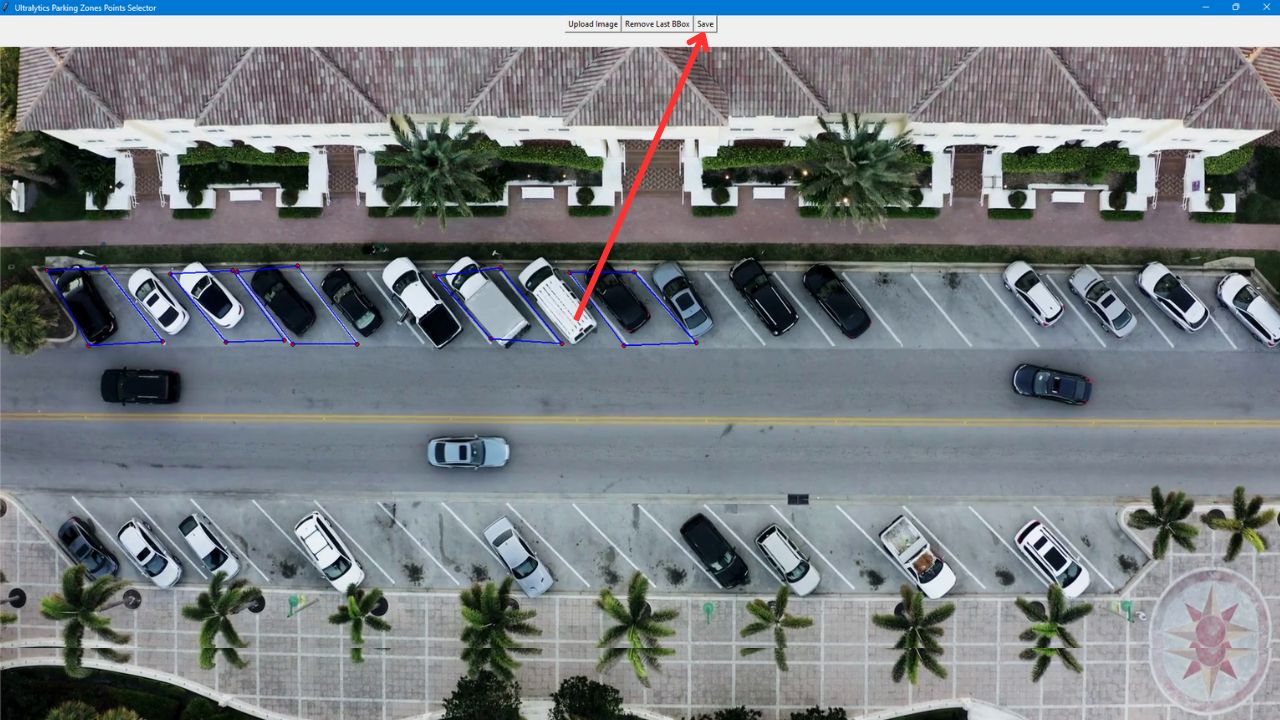
Choosing parking points is a critical and complex task in parking management systems. Ultralytics streamlines this process by providing a tool that lets you define parking lot areas, which can be utilized later for additional processing.
|
|
|
|
- Capture a frame from the video or camera stream where you want to manage the parking lot.
|
|
- Use the provided code to launch a graphical interface, where you can select an image and start outlining parking regions by mouse click to create polygons.
|
|
|
|
!!! Warning "Image Size"
|
|
|
|
Max Image Size of 1920 * 1080 supported
|
|
|
|
```python
|
|
from ultralytics.solutions.parking_management import ParkingPtsSelection, tk
|
|
|
|
root = tk.Tk()
|
|
ParkingPtsSelection(root)
|
|
root.mainloop()
|
|
```
|
|
|
|
- After defining the parking areas with polygons, click `save` to store a JSON file with the data in your working directory.
|
|
|
|
|
|
|
|
### Python Code for Parking Management
|
|
|
|
!!! Example "Parking management using YOLOv8 Example"
|
|
|
|
=== "Parking Management"
|
|
|
|
```python
|
|
import cv2
|
|
from ultralytics import solutions
|
|
|
|
# Path to json file, that created with above point selection app
|
|
polygon_json_path = "bounding_boxes.json"
|
|
|
|
# Video capture
|
|
cap = cv2.VideoCapture("Path/to/video/file.mp4")
|
|
assert cap.isOpened(), "Error reading video file"
|
|
w, h, fps = (int(cap.get(x)) for x in (cv2.CAP_PROP_FRAME_WIDTH, cv2.CAP_PROP_FRAME_HEIGHT, cv2.CAP_PROP_FPS))
|
|
|
|
# Video writer
|
|
video_writer = cv2.VideoWriter("parking management.avi", cv2.VideoWriter_fourcc(*"mp4v"), fps, (w, h))
|
|
|
|
# Initialize parking management object
|
|
management = solutions.ParkingManagement(model_path="yolov8n.pt")
|
|
|
|
while cap.isOpened():
|
|
ret, im0 = cap.read()
|
|
if not ret:
|
|
break
|
|
|
|
json_data = management.parking_regions_extraction(polygon_json_path)
|
|
results = management.model.track(im0, persist=True, show=False)
|
|
|
|
if results[0].boxes.id is not None:
|
|
boxes = results[0].boxes.xyxy.cpu().tolist()
|
|
clss = results[0].boxes.cls.cpu().tolist()
|
|
management.process_data(json_data, im0, boxes, clss)
|
|
|
|
management.display_frames(im0)
|
|
video_writer.write(im0)
|
|
|
|
cap.release()
|
|
video_writer.release()
|
|
cv2.destroyAllWindows()
|
|
```
|
|
|
|
### Optional Arguments `ParkingManagement`
|
|
|
|
| Name | Type | Default | Description |
|
|
|--------------------------|---------|-------------------|----------------------------------------|
|
|
| `model_path` | `str` | `None` | Path to the YOLOv8 model. |
|
|
| `txt_color` | `tuple` | `(0, 0, 0)` | RGB color tuple for text. |
|
|
| `bg_color` | `tuple` | `(255, 255, 255)` | RGB color tuple for background. |
|
|
| `occupied_region_color` | `tuple` | `(0, 255, 0)` | RGB color tuple for occupied regions. |
|
|
| `available_region_color` | `tuple` | `(0, 0, 255)` | RGB color tuple for available regions. |
|
|
| `margin` | `int` | `10` | Margin for text display. |
|
|
|
|
### Arguments `model.track`
|
|
|
|
| Name | Type | Default | Description |
|
|
|-----------|---------|----------------|-------------------------------------------------------------|
|
|
| `source` | `im0` | `None` | source directory for images or videos |
|
|
| `persist` | `bool` | `False` | persisting tracks between frames |
|
|
| `tracker` | `str` | `botsort.yaml` | Tracking method 'bytetrack' or 'botsort' |
|
|
| `conf` | `float` | `0.3` | Confidence Threshold |
|
|
| `iou` | `float` | `0.5` | IOU Threshold |
|
|
| `classes` | `list` | `None` | filter results by class, i.e. classes=0, or classes=[0,2,3] |
|
|
| `verbose` | `bool` | `True` | Display the object tracking results |
|